



It’s a frustratingly common scenario in paper converting. A slitting machine produces perfect, clean-edged rolls for the first hour after a deep clean. But by the end of the shift, the edges are fuzzy, the rolls are being rejected, and operators are fighting a losing battle against a fine layer of dust that covers everything.
Many buyers and operators see this as a simple housekeeping issue. The assumption is that if you just clean more often or attach a generic shop vacuum nearby, the problem will go away. But the dust keeps coming back, and so do the quality problems and unexpected machine stoppages.
The better way to think about this is to see paper dust not as a mess to be cleaned up, but as a process variable that must be controlled. The dust isn’t just on your machine; it’s getting inside it, actively degrading your product and accelerating wear on key components.
Paper dust directly affects slitting quality by building up between blades, which can increase the cutting gap and create fuzzy or torn edges. For maintenance, its abrasive nature accelerates wear on unsealed bearings and drive components, while its buildup on sensors can cause web tracking errors and machine stoppages. The ability to manage it depends on the paper type, the design and placement of the dust extraction system, and the use of sealed machine components.
Understanding where and how this dust does its damage is the first step to solving the problem for good.
What Are the First Signs That Paper Dust Is Harming My Slit Quality?
Before causing a major breakdown, paper dust leaves clear clues on your finished product. If you’re seeing an increase in rejected rolls, look for these specific defects first. They are often misdiagnosed as blade or tension issues, but dust is a frequent root cause.
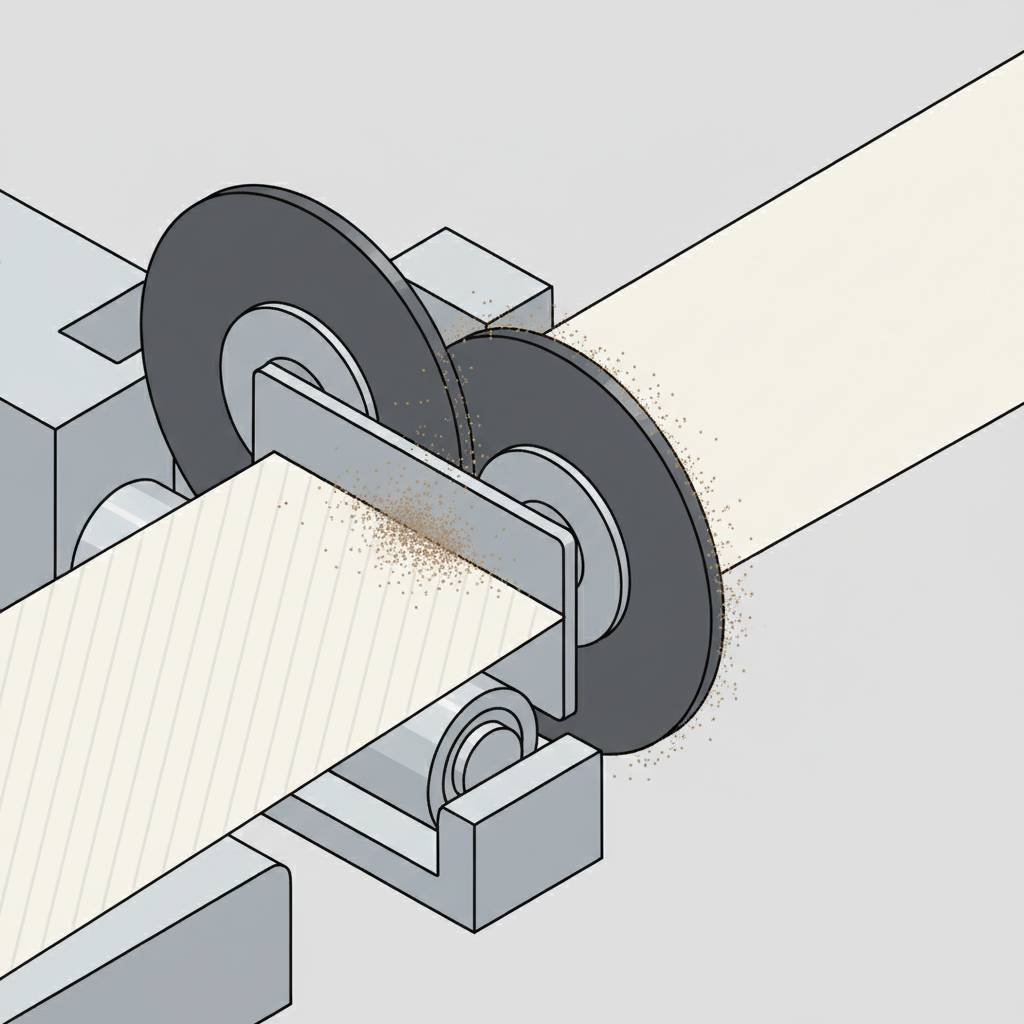
- Fuzzy or Weak Edges: This is the most common sign. As fine dust builds up on and between the upper and lower shear blades, it effectively increases the clearance. The blades no longer make a clean scissor cut; instead, they start to tear the paper, creating a weak, fibrous edge that can cause problems in downstream processes.
- Dust Contamination on the Roll Face: When dust is generated at the blades, it can be carried along with the web and wound into the finished roll. For applications with high hygiene standards or sensitive end-uses like packaging, this contamination can lead to customer rejection.
- Inconsistent Slit Widths: Dust accumulating on rollers or guides can cause the paper web to wander slightly, leading to subtle variations in the finished slit width.
Where Does Dust Build Up to Cause Machine Downtime and Wear?
The most expensive damage from paper dust happens in places you can’t easily see. While operators are busy sweeping the floor, abrasive particles are working their way into the heart of the machine. When our service team hears about frequent component replacement, the investigation usually starts in these five areas.
1. Between the Blades: As mentioned, this is the primary cause of poor slit quality. 2. On Web Guide Sensors: A thin layer of dust on the lens of an optical web guide sensor is all it takes to block its view. The system can no longer detect the edge of the paper accurately, leading to tracking errors and telescoped rolls. 3. Inside Unsealed Bearings: This is a significant maintenance issue. Abrasive dust that gets past a bearing’s seal is like pouring sand into a gearbox. It can damage the internal raceways, leading to premature failure, unusual grinding noises, and unplanned downtime. 4. On Lay-on Rollers: Dust buildup on the surface of a lay-on roller (or contact roller) creates high spots. This can result in uneven pressure across the rewinding roll, leading to inconsistent roll density and potential winding defects. 5. In Electrical Cabinets: Cooling fans on electrical cabinets can pull airborne dust inside. This dust coats circuit boards, connectors, and heat sinks, which can lead to overheating, intermittent faults, or even short circuits.
A Practical Checklist to Diagnose Your Dust Problem
If you suspect dust is the source of your issues, you can move from suspicion to diagnosis. The simplest method is the "before and after" check: perform a deep clean of the slitting section, run a test roll, and save a sample of the edge. Then, run the machine for a few hours and compare a new sample to the first one. If you see a clear degradation in quality, you have your evidence.
For a more systematic approach, use this checklist to connect the symptoms you’re seeing to their likely cause.
Dust-Related Issue Diagnosis Checklist
| Symptom / Issue Observed | Likely Cause Related to Dust | What the Buyer Should Check |
|---|---|---|
| Fuzzy, torn, or weak slit edges | Dust buildup between upper and lower shear blades increases the cutting clearance, causing a tearing action instead of a clean cut. | After a production run, inspect the blade assembly for visible particle buildup. Compare edge quality immediately after a deep clean versus after several hours of operation. |
| Uneven or telescoping rewind rolls | Dust coating the web guide sensor lens prevents accurate detection of the web edge, leading to tracking errors. | Check the finished roll sides for inconsistency. Carefully clean the web guide sensor lens and observe if tracking performance improves temporarily. |
| Grinding or high-pitched noises from rollers | Abrasive dust has penetrated unsealed bearings, causing accelerated wear and potential seizure. | Listen for unusual noises near idler rollers, especially those close to the slitting section. Check the machine’s original specification for "sealed bearings." |
| Intermittent machine stops or sensor faults | Airborne dust has been pulled into the electrical cabinet, coating circuit boards or heat sinks, leading to overheating or intermittent faults. | Inspect the filters on the electrical cabinet. Check if the cabinet is a sealed and pressurized design or if it relies on simple, often-clogged filters. |
What Makes a Dust Management System Truly Effective for Paper Slitting?
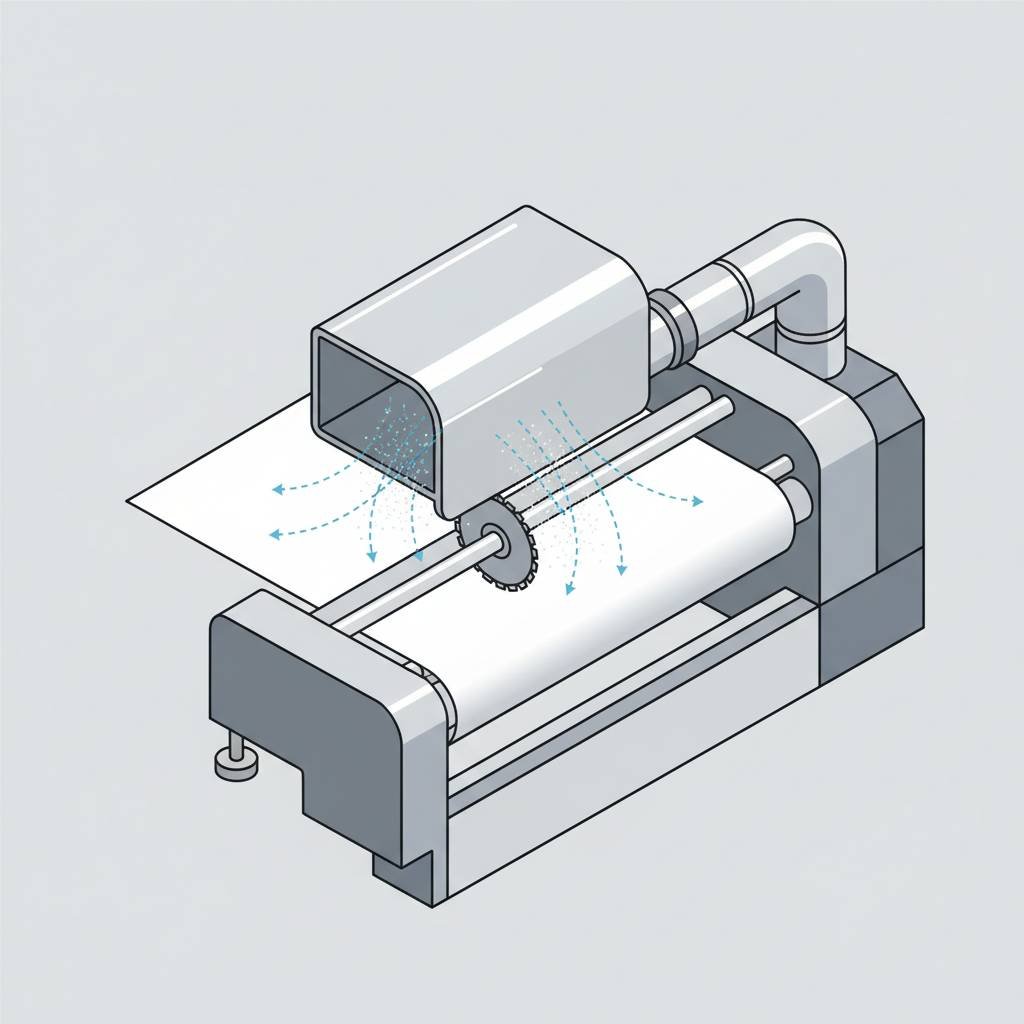
Once you’ve confirmed dust is the problem, the next misstep is assuming any vacuum attachment is a solution. A powerful-looking, standalone dust collector placed next to the machine is often less effective than a smaller system that is fully integrated into the machine’s design.
Effectiveness is not about the size of the motor; it’s about the location of the suction.
An effective system captures dust at the point of creation. This means having custom-designed extraction hoods positioned as close as possible to the slitting blades. Think of it like a range hood over a stove—it works because it captures smoke and steam at the source, not from across the room.
Beyond extraction, a truly robust machine for paper includes:
- Integrated Extraction Hoods: Positioned directly at the slitting station to capture dust as it’s generated.
- Sealed Bearings: Especially for any rollers in the web path near the slitting section. This is an important feature for helping protect against premature wear.
- Sealed or Pressurized Electrical Cabinets: This helps prevent dust from being pulled inside and coating sensitive electronics.
A lower-priced machine often omits these features. The initial saving can be lost to higher maintenance costs, more production waste, and frequent downtime.
What Should I Ask a Supplier to Avoid Future Dust-Related Problems?
When you’re evaluating a new slitting machine for a paper application, you can cut through the sales talk by asking specific, technical questions about dust management. A supplier who understands paper converting will have clear, confident answers. A supplier who doesn’t may give vague promises.
Before you request a quotation, prepare to ask:
1. Can you show me the design and placement of your dust extraction system? Ask for diagrams or photos that show the suction hoods are at the blades, not just a hose nearby. 2. Are the bearings in the web path sealed? Ask them to confirm this in the technical specification sheet. This is a key indicator of machine durability. 3. Is the main electrical cabinet sealed and pressurized? This detail reveals if the machine is designed for long-term reliability in an industrial environment. 4. How do you account for different types of paper? A good supplier will know that the abrasive dust from kraft paper requires a more robust solution than the lighter dust from coated paper.
Comparing quotations based on the answers to these questions will give you a much clearer picture of the machine’s true long-term value than comparing the initial price alone.
Preparing Your Inquiry
Before you request a quotation for a new slitting machine, prepare the following information to help you get a solution that truly solves your dust-related issues:
- Your paper type, thickness, and basis weight.
- A description or photos of your current slit quality problems (e.g., fuzzy edges).
- A list of any components that fail frequently on your current machine (e.g., bearings, sensors).
- Your required working width, parent/finished roll diameters, and target speed.
Send this information to a potential supplier and ask them to explain, specifically, how their machine design addresses dust control at the blades, what type of bearings are used, and how the electrical systems are protected. A clear answer to these questions is more valuable than a low initial price.